


Create
Create reserve mandate
There are two ways to create a Reserve mandate—Intent based and Collect based
The process for mandate creation is described in the below diagram:
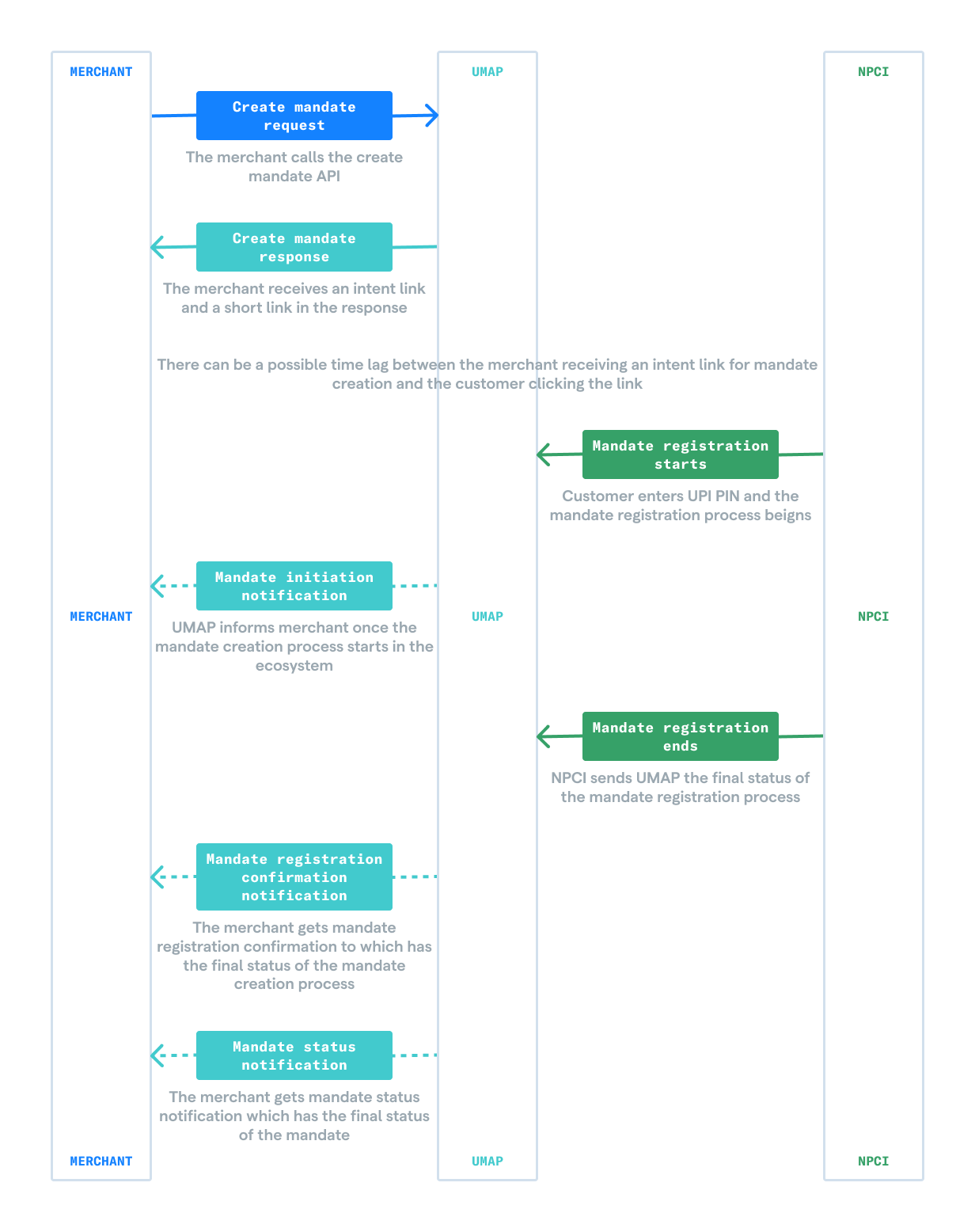
The merchant will have to call the create mandate API with the correct set of parameters.
| Staging host | https://umap.setu.co/api |
|---|---|
| Method | POST |
| Path | /v1/merchants/mandates |
| Header |
|
Sample request
{
    "allowMultipleDebit": false,
    "amount": 1000,
    "amountRule": "max",
    "autoExecute": false,
    "autoPreNotify": false,
    "blockFunds": false,
    "creationMode": "qr",
    "currency": "INR",
    "customerRevocable": false,
    "customerVpa": "ram@axis",
    "endDate": "02012008",
    "expireAfter": 120,
    "firstExecutionAmount": 0,
    "frequency": "one time",
    "initiationMode": "01",
    "maxAmountLimit": 1000,
    "merchantReferenceId": "ABC1234789",
    "merchantVpa": "acme.corp@axis",
    "productConfigId": "01ARZ3NDEKTSV4RRFFQ69G5FAV",
    "purpose": "14",
    "recurrenceRule": "on",
    "recurrenceValue": 0,
    "shareToPayee": false,
    "startDate": "02012006",
    "transactionNote": "Transaction note"
}| parameter | value |
|---|---|
| frequency | one time |
| creationMode | intent or qr |
| initiationMode | 01 if creationMode is qr 04 if creationMode is intent |
| recurrenceValue | 0 |
| recurrenceRule | on |
| autoExecute | false |
| autoPreNotify | false |
Sample response
{
    "allowMultipleDebit": false,
    "amount": 1000,
    "amountRule": "max",
    "autoExecute": false,
    "autoPreNotify": false,
    "blockFunds": false,
    "createdAt": "2023-09-04T12:08:20+0530",
    "creationMode": "qr",
    "currency": "INR",
    "customerRevocable": true,
    "customerVpa": "ram@axis",
    "endDate": "02012008",
    "expireAfter": 120,
    "firstExecutionAmount": 0,
    "frequency": "one time",
    "id": "01ARZ3NDEKTSV4RRFFQ69G5FAV",
    "initiationMode": "01",
    "intentLink": "upi://mandate?pa=acme.corp@axis&pn=merchant-1&validitystart=02012006&validityend=02012008&am=100.00&amrule=MAX&recur=ONETIME&tr=BTTZrc5gDFkuCr3n3I0ey4aNtzLOLR7K7aR&cu=INR&mc=1234&mode=01&purpose=14&rev=Y&share=N&qrexpire=02012006&block=N&orgid=409214&version=2.0&txnType=CREATE&tid=BTTZrc5gDFkuCr3n3I0ey4aNtzLOLR7K7aR",
    "maxAmountLimit": 1000,
    "merchantId": "01ARZ3NDEKTSV4RRFFQ69G5FAV",
    "merchantReferenceId": "ABC1234789",
    "merchantVpa": "acme.corp@axis",
    "productConfigId": "01ARZ3NDEKTSV4RRFFQ69G5FAV",
    "purpose": "14",
    "recurrenceRule": "on",
    "recurrenceValue": 0,
    "shareToPayee": false,
    "startDate": "02012006",
    "status": "pending",
    "transactionNote": "Transaction note",
    "txnId": "BTTZrc5gDFkuCr3n3I0ey4aNtzLOLR7K7aR"
}intentLinkor corresponding qr can be shared directly with customers via a communication channel.idis a unique mandate ID that is associated with this mandate and can be used to track it later.
This request to generate a mandate creation intent link / qr is flexible and allows for many use cases. To know more about all the API params, please refer to the API documentation here. Post this, once the customer clicks on the intent link / scans the qr code and enters the mPIN, the merchant will receive webhooks for following events:
mandate.initiated (if no validation errors are encountered on UPI Setu during mandate creation)
- mandate_operation.create.initiated
mandate.live (if mandate creation is successful)
mandate_operation.create.success (if mandate creation is successful)
mandate.rejected (if mandate creation fails due to mandate intent / qr expiry)
mandate_operation.create.failed (if mandate creation fails)
Read more about mandate status notifications here and mandate create operation notifications here In addition to the notifications, the merchant can also use check mandate status API to check if mandate is LIVE