


Fetch & Pay
APIs to implement
Fetch customer bill
This is a multi-leg transaction between BBPS, Setu, and the biller system.
BBPS calls Setu with customer identifier(s) details entered by a customer on a BBPS enabled app / offline collection point.
Setu calls the biller with the same details with the API to fetch bill ↗ for the customer, and then, shares it with BBPS.
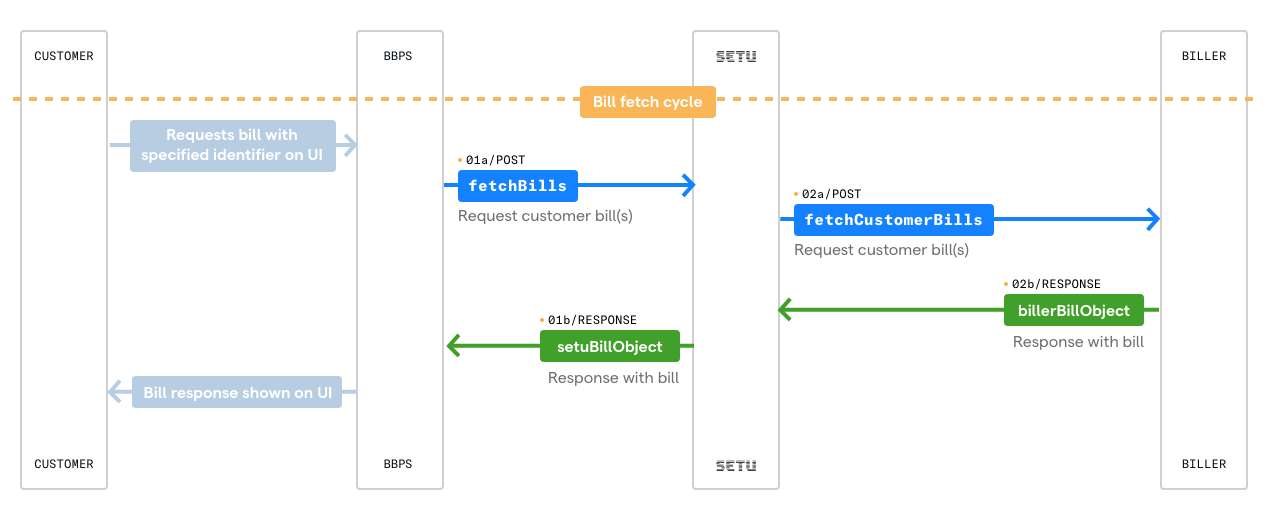
The biller’s API URL is expected to be in the following format—
https://<partner-base-api-url>/bills/fetchPlease note, Setu will add the /bills/fetch at the end of this
URL.
The request body will specify the customer identifier—
{
      "customerIdentifiers": [
        {
          "attributeName": "customerId",
          "attributeValue": "9117534711"
        }
      ]
}
Note:
customerIdis defined as per biller's use case, such as loanNumber, studentId, etc
Response scenarios
When BBPS sends a fetch bill request to Setu, Setu forwards the request to biller specified baseURL. Setu expects to receive a response from the biller system, with three possible scenarios—
- Success, with outstanding bill for customer
- Identifier matched, but no outstanding bill for customer
- Failure, no customer found
Scenario 1: Success, with outstanding bill for customer
The is when the customer is present in the biller system, and has outstanding bills. In this case, the biller can return a 200 response—
{
  "data": {
    "customer": {
      "name": "Sharmaji Ka Beta",
      "additionalInfo": [
        {
          "EMI Amount": "900"
        },
        {
          "Charges": "100"
        }
      ]
    },
    "billDetails": {
      "bills": [
        {
          "items": [],
          "generatedOn": "2022-06-07T05:18:02.234Z",
          "customerAccount": {
            "id": "9117534711"
          },
          "recurrence": "ONE_TIME",
          "aggregates": {
            "total": {
              "amount": {
                "value": 100000, // in paise
                "currencyCode": "INR"
              },
              "displayName": "Total Receivable"
            }
          },
          "billerBillID": "891234567",
          "amountExactness": "EXACT"
        }
      ],
      "billFetchStatus": "AVAILABLE"
    }
  },
  "status": 200,
  "success": true
}
Note
additionalInfoitems will be displayed in the Payment App/site which can describe additional information about the bill.itemsare used to show details about the bill / itemized break up. Maximum of 4.generatedOnanddueDatemust adhere to the following guidelines from NPCIgeneratedOnshould not be greater thandueDategeneratedOnshould not be a future datedueDateshould not be equal togeneratedOn
Scenario 2: Identifier matched, but no outstanding bill for customer
When a customer is identified in the biller system but has paid all bills, and so, has no outstanding bill amount. In this case, the biller can return a 200 response—
{
      "data": {
        "billDetails": {
          "billFetchStatus": "NO_OUTSTANDING",
          "bills": []
        },
        "customer": {
          "name": "Sharmaji Ka Beta"
        }
      },
      "success": true,
      "status": 200
}
The dueDate can be the last payment date from the customer or the current timestamp.
Scenario 3: Failure, no customer found
Either the biller does not recognise the parameter, or there are no customers with that particular parameter.
Then, the biller can return a 400 response—
{
      "success": false,
      "status": 400,
      "error": {
        "traceID": "XXXXXX",
        "code": "customer-not-found",
        "docURL": "",
        "detail": "A customer with the provided credentials does not exist in the biller system.",
        "title": "customer-not-found"
      }
}
Fetch bill payment receipt
This is a multi-leg transaction between BBPS, Setu, and the biller system. As described in the diagram below, BBPS calls Setu, and Setu in turn calls the biller with fetchBillReceipt ↗
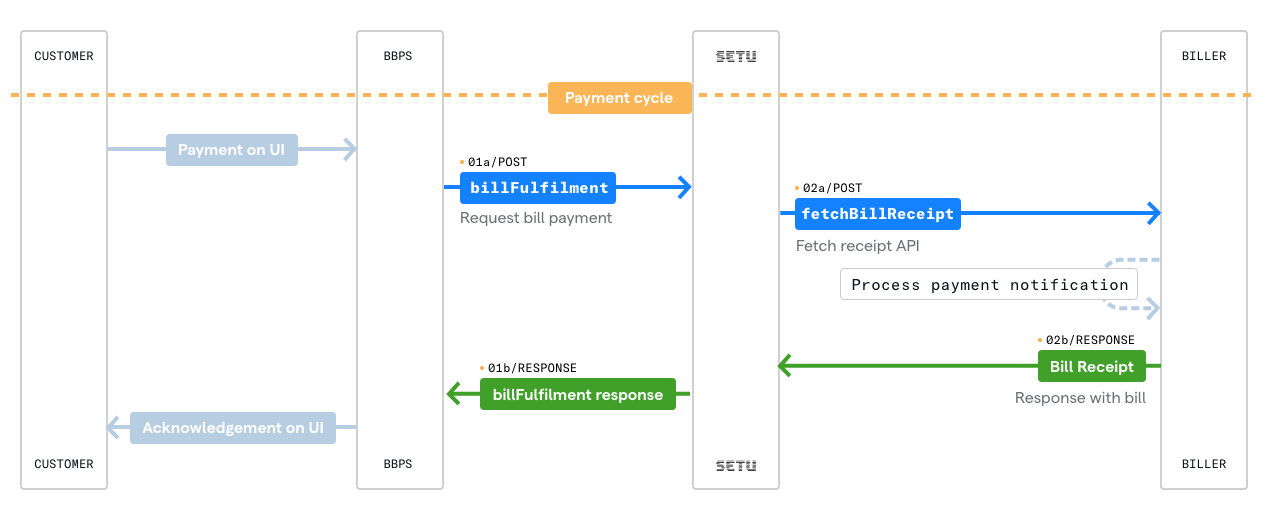
Once a payment is received against a bill, Setu gets a notification and in turn makes the fetchBillReceipt ↗ API call to the biller system. The biller’s API URL should be in the following format—
https://<partner-base-api-url>/bills/fetchReceiptSetu adds the /bills/fetchReceipt at the end of biller provided baseURL.
A typical request for a receipt would look something like—
{
      "platformBillID": "906910589572351478",
      "billerBillID": "891234567",
      "paymentDetails": {
        "amountPaid": {
          "value": 1000,
          "currencyCode": ""
        },
        "billAmount": {
          "value": 1000,
          "currencyCode": ""
        },
        "platformTransactionRefID": "26602931-3b6a-4c87-a14d-5d7cf584008f",
        "uniquePaymentRefID": "PP012151MYB616O9BSY1",
        "instrument": "UPI",
        "additionalInfo": null,
        "transactionNote": "",
        "transactionTimestamp": "2020-05-22T03:05:22.000Z",
        "campaignID": ""
      }
}
Once you receive this call—
- Create a receipt against
uniquePaymentRefID. - Update your ledger to reflect this new balance.
- Return a
200response withidanddate.
Success response
{
      "status": 200,
      "success": true,
      "data": {
        "receipt": {
          "id": "XYZ987-891234567",
          "date": "2022-06-07T05:55:54.789Z"
        }
      }
}
Failure scenarios
Case 1
If your system cannot accept or process payment due to some use case or validation related error or business requirement or Technical error on biller server (such as server down, bad gateway, unavailable, etc), you respond with a 500 response -
{
    "status": 500,
    "success": false,
    "error": {
        "code": "unable-to-fulfill-request",
        "detail": "An error occured while processing this request.",
        "docURL": "",
        "title": "API_ERROR",
        "errors": [],
        "traceID": "XXXXXX"
    }
}
Note:
- During Payment request, when your system fails to respond to Setu in 30 secs or responds with an error, the request to
/fetchReceiptwill be reattempted with the same request body as the first attempt. - You must implement a Duplicate check against
uniquePaymentRefID- If the
uniquePaymentRefIDdoesn't exist for that Transaction, you must update the same and return a200Success response - If the same
uniquePaymentRefIDexists in your system for that Transaction, you can return a200Success response
- If the
Security considerations
- The API should work from only whitelisted IPs (on production)
- HTTPS is mandatory
- Authentication mechanism is required. Supported methods—Basic auth, JWT, OAuth.
APIs to call
Expire Bill (optional)
This API immediately changes the status of an unpaid link to BILL_EXPIRED. The customer would not be able to pay using the link or the associated VPA, but even if they are somehow able to do that (due to app caching or similar issues) the amount would automatically be refunded.
platformBillID is a unique identifier for a bill on Setu's system and has to be provided to expire the bill. This is made available in the Create Payment Link API's response.
| Method | POST |
|---|---|
| Path | /utilities/bills/< |
| Header |
|
Success
{
    "status"  : 200,
    "success" : true
}
Failure
In case the platformBillID provided is incorrect, Setu will respond with 400 bill not found error—
{
    "status": 400,
    "success": false,
    "error": {
        "code": "bill-not-found",
        "detail": "Bill with ID [<platformBillID>] not found.",
        "docURL": "",
        "title": "PLATFORM_ERROR",
        "errors": [],
        "traceID": "XXXXXX"
    }
}
If a bill has been expired, ideally, a payment by a customer would not be allowed, if verify VPA call returns an error on a payment app.
But if the verify VPA call was not made and the customer makes a payment, payment will go through but will be refunded in the settlement flow.