


Polling
This set of APIs has been deprecated. It is recommended to use these APIs instead.
BillPay COU APIs are asynchronous and require a polling mechanism to retrieve results. The duration for the intervals between polling and end states are documented below.
We strongly recommend using a persistent queue like RabbitMQ to process these APIs.
Flowchart for polling logic
These APIs are mandatory to consume, and asynchronous and dependent on each other. The APIs that require polling logic—
Bill fetch APIsbill-fetch-request and get-fetched-bill
Bill payment APIs
make-payment and get-payment-status
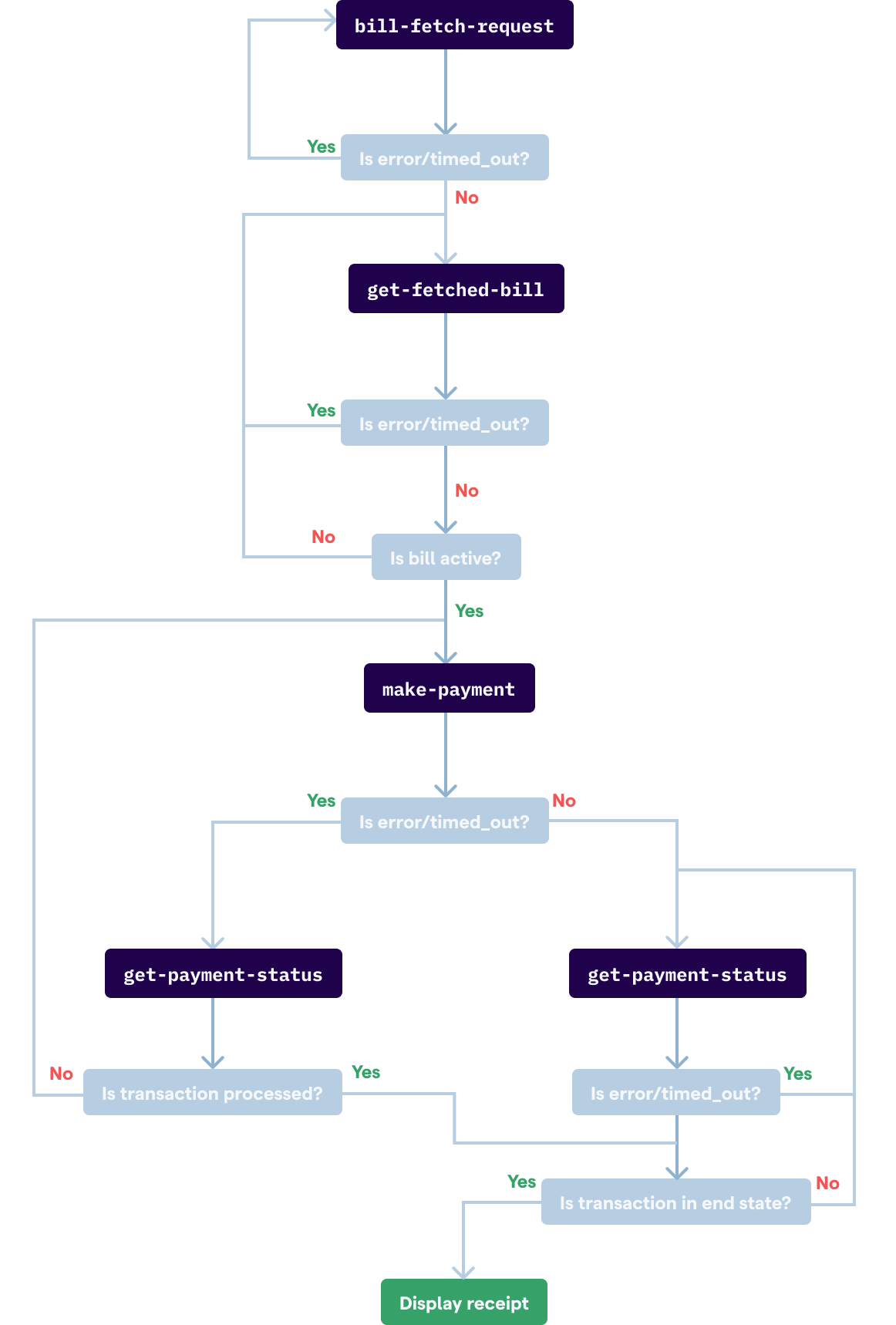
Bill fetch APIs
The Bill Fetch APIs are used to retrieve outstanding bills from a biller. These are the bill-fetch-request and get-fetched-bill APIs.
The context from the response for bill-fetch-request has to be passed as the request for get-fetched-bill.
The get-fetched-bill API must be called 5 secs after a successful bill-fetch-request—
- If the
fetchAPIStatus, from response ofget-fetched-bill, isAcknowledgedit means that the request is still processing. You'll need to re-hit theget-fetched-billwith the same context again after 5 secs and wait forfetchAPIStatusto becomeActive. - If the
fetchAPIStatusdoes not becomeActiveafter retrying the same for 1 minute you can terminate the bill fetch and display an error.
If either bill-fetch-request or get-fetched-bill
has an error/timeout and does NOT give a response, you can retry the APIs
with the same request body.
If fetchAPIStatus, from get-fetched-bill response is—
Acknowledged—The request is still processing. Retry after 5 secs.Cancelled—The request has finished processing but there was an error. You can display the provided error message.Rejected—The request finished processing but there was an error. You can display the provided error message.Active—The request has finished processing successfully. You can display the bill and redirect the user to payment screens.
Make payment APIs
The make-payment and get-payment-status APIs are used to complete payment for outstanding bills of a biller.
The context from the response of get-fetched-bill has to be passed as the request for make-payment. Similarly, context from the response of make-payment has to be passed as the request for get-payment-status.
The get-payment-status API must be called 5 secs after a successful make-payment call—
- If the status from the response of
get-payment-statusisExecution Awaitedit means the request is still processing. You'll need to re-hitget-payment-statuswith the same context again after 5 secs and wait for status to becomeSettledorCancelledorRejected. - If the
statusdoes not go into an end state after retrying the same for 5 minutes, you can retry theget-payment-statuswith the same context again once every 5 minutes till it goes to an end state. If the end state is notSettledorCancelledorRejectedeven after 1 day, please contact us at Setu Support.
If the make-payment API errors/timeouts and does NOT give a response you can pass the context used in the make-payment request body as the context for get-payment-status request.
This will help you identify if the payment in question has been registered with the BBPS system.
Never call the make-payment API multiple times for the same
context as it may result in your account getting debitted multiple times.
If the get-payment-status API errors/times out and does not give a response you can retry with the same request body.
If status, obtained in the response of get-payment-status is—
Execution Awaited—The request is still processing. Please retry after 5 secs.Cancelled—The request has finished processing but there was an error. You can display the provided error message.Rejected—The request has finished processing but there was an error. You can display the provided error message.Settled—The request has finished processing successfully. You can display the receipt for your user.